Bazi Chart: Generate One and Check Your Birth Inputs
A Bazi chart expresses a birth date and time as Year, Month, Day and Hour stem–branch pairs: the Four Pillars, or eight characters. To generate one, select the calendar, enter the date and recorded local time, and supply the birthplace or time zone; this calculator also accepts longitude, a solar-time choice and a day-boundary setting. Mark an unknown hour as unknown, then check the date and time receipt before reading the result.
What to enter before pressing Calculate
Read the calendar label on the original record first. This calculator takes Gregorian dates or Chinese lunar dates with an explicit leap-month selection. Do not convert a date by changing its label. For a lunar source, use the lunar leap-month checks; the worked cases below deliberately use only Gregorian dates. Source: normalize and calculate in the local engine.
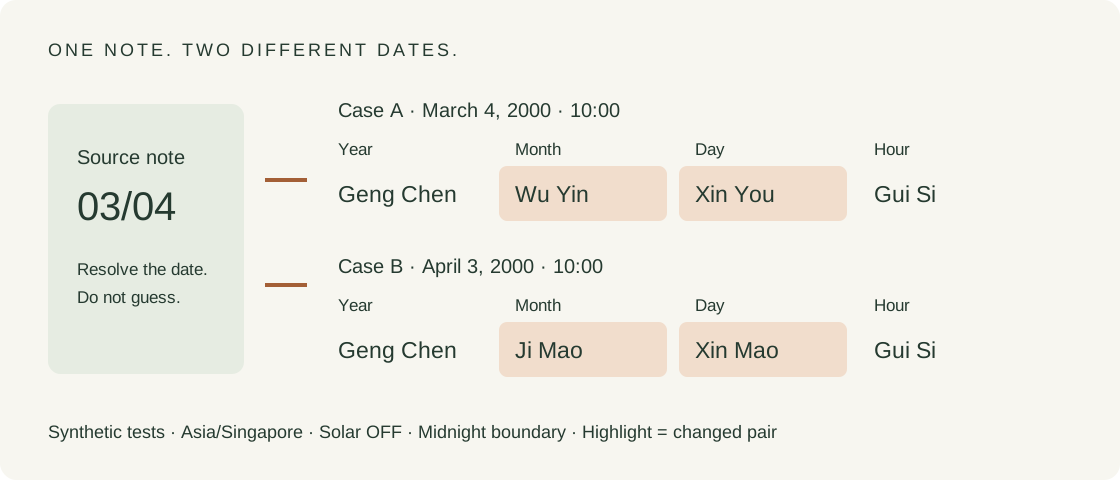
Use the separate Year, Month and Day controls. Read a numerical date aloud as a named month and day before entering it, then check the normalized Gregorian date after calculation. This is a record-checking procedure, not a claim that software can recover an ambiguous handwriting convention. The controlled March/April pair below shows why this extra check matters.
Enter the clock time recorded at birth, then select the named time zone for that place and date. Keep solar correction and the day-boundary setting visible rather than silently modifying the written time yourself. The sex selector is used for this engine’s traditional luck-cycle direction; it is not a replacement for a calendar or location field. Source: local input and calculation code.
Press Calculate my chart, open “See how your time became this chart”, and compare Recorded local time, Historical UTC offset, UTC instant, Pillar clock and Day boundary with the chosen inputs. If the date is already wrong, correct that before interpreting the pillars. These are labels in this site’s actual result receipt, not a universal interface standard. Source: render and result fields.
Six synthetic records you can reproduce
Case A preserves March 4, 2000 at 10:00 as 2000-03-04 10:00 and resolves it to 2000-03-04 02:00 UTC; its four pillars are Geng Chen / Wu Yin / Xin You / Gui Si. This is the baseline to reproduce before trying a personal record. It uses Gregorian input, Asia/Singapore, longitude 103.8° east, male, known time, solar adjustment OFF and the midnight day boundary. All six records here are synthetic. Source: six-case input and output ledger; unchanged engine.
| Case and local record | Year | Month | Day | Hour |
|---|---|---|---|---|
| A · 2000-03-04 10:00 | Geng Chen | Wu Yin | Xin You | Gui Si |
| B · 2000-04-03 10:00 | Geng Chen | Ji Mao | Xin Mao | Gui Si |
| C · 2000-03-04 10:01 | Geng Chen | Wu Yin | Xin You | Gui Si |
| D · 2000-02-28 10:00 | Geng Chen | Wu Yin | Bing Chen | Gui Si |
| E · 2000-02-29 10:00 | Geng Chen | Wu Yin | Ding Si | Yi Si |
| F · 2000-03-01 10:00 | Geng Chen | Wu Yin | Wu Wu | Ding Si |
Case B changes only the month and day fields to April 3, 2000 and returns Geng Chen / Ji Mao / Xin Mao / Gui Si. This is a controlled transcription test for the ambiguous note “03/04”. The calculation cannot decide which date the writer intended. Resolve that ambiguity from the record before choosing the separate Month and Day fields. Source: six-case input and output ledger; unchanged engine.
Why a quick glance can miss the mistake
Comparing A with B changes the Month and Day pillars while the Year and Hour pairs remain identical, so checking only the first and last columns would miss this date-entry error. The comparison is confined to the displayed pillar pairs, not every hidden field or reading sentence. Retain the full normalized date beside the result instead of accepting a plausible-looking set of characters. Source: six-case input and output ledger; unchanged engine.
Both A and B have the Xin Day Master, even though their Day branches are You and Mao; a matching Day Master is therefore an insufficient check for this pair. Compare the complete Day pair as well as the date receipt. A familiar Day Master label can remain present after a substantial input mistake; it cannot confirm the source record on its own. Source: six-case input and output ledger; unchanged engine.
Does changing a minute always change the chart?
Case C moves A from 10:00 to 10:01: the receipt moves from 02:00 to 02:01 UTC, yet all four pillar pairs remain identical. Here the minute was read and used, despite producing the same natal pairs. This interior-hour example cannot establish that a minute is harmless near an hour, day or solar-term boundary. Source: six-case input and output ledger; unchanged engine.
The unchanged pillars in A and C do not imply an unchanged full result: their luck-onset intervals are 0y 4m 23d 12h and 0y 4m 23d 10h respectively. The unchanged engine uses a separate minute-sensitive luck-onset calculation. These displayed intervals are traditional model outputs, not measured life events. Keep a claim about “the same chart” specific to the fields actually compared. Source: six-case input and output ledger; unchanged engine.
What happens around February 29?
Case D, February 28, 2000 at 10:00, returns Geng Chen / Wu Yin / Bing Chen / Gui Si. This is the first of three consecutive Gregorian dates, with all other settings held at the baseline values. It supplies the pre-leap-day comparison rather than an invented rule about every February birth. Source: six-case input and output ledger; unchanged engine.
Case E accepts February 29, 2000 without rolling it into March and returns Geng Chen / Wu Yin / Ding Si / Yi Si. The accepted Gregorian date and the pillar output are separate checks in the ledger. This example concerns a Gregorian leap day; the Chinese lunar leap-month checkbox remains OFF and must not be used to represent February 29. Source: six-case input and output ledger; unchanged engine.
Case F, March 1, 2000 at 10:00, returns Geng Chen / Wu Yin / Wu Wu / Ding Si. Comparing only February 28 with March 1 would omit an accepted date between them in this tested year. The three-run sequence makes that omission visible without relying on a generic calendar illustration. Source: six-case input and output ledger; unchanged engine.
Across D, E and F, the Year and Month pairs stay fixed and the Hour branch stays Si, but the Hour stem changes from Gui to Yi to Ding; retaining the same clock hour does not freeze the entire Hour pillar across different dates. This is an observed dependency in these three outputs, not an independent accuracy certification. It tells a beginner to compare both characters of the Hour pair instead of looking only for the same animal or time slot. Source: six-case input and output ledger; unchanged engine.
What to keep with your first Bazi chart
Keep the source calendar, the unambiguous date, recorded time or unknown-hour status, time zone, longitude and selected conventions beside the four pairs. A chart screenshot alone may not preserve these decisions. In this calculator Copy includes a textual result, Print offers a paper-style record, and Share link encodes the inputs in the URL; do not share that URL if you want those details private. Source: copyText, share and print handlers.
Check the result before interpreting its labels. The chart-column guide explains where the Day Master and hidden stems appear. The Bazi calculator and analysis guide traces what the automatic reading actually uses. This page handles the earlier task: getting a known record into a chart without silently changing the date.
What if my birth time is missing?
Choose the unknown-time option instead of fabricating 10:00 from these examples. The engine omits the Hour pillar and uses a noon reference for provisional displayed fields, with sampled alternatives when the other pillars vary. Its sampling does not prove that an entire day has no exact boundary. Read the unknown-time limits before treating a partial result as fixed. Source: unknown-time branch of calculate.
Which parts have been checked here?
These six local tests check transcription and specific calendar outputs under the disclosed settings. They do not test every time zone, date, school or historical record, and they do not validate predictions. The bundled calendar is lunar-javascript 1.7.7; the app and its original algorithms were left unchanged. The raw ledger records the exact engine hash and test environment. Sources: six-case input and output ledger; calendar implementation.
The three-minute time check
Enter the same synthetic date, recorded time, time zone and longitude, check the historical UTC offset and UTC instant, then toggle solar time and compare the Day and Hour results with the linked eight-case ledger.
- Time zone. Keep the recorded local clock time and select the birth-place zone for that date. Record the historical UTC offset and resolved UTC instant. Time-zone reference.
- Daylight saving. Check whether the named zone has already included the seasonal offset; do not subtract it again. US DST reference and our tested offset pairs.
- Solar time. Hold the inputs fixed, switch solar time off and on, then record the pillar clock and Day/Hour results. In this calculator that switch changes the selected clock, not the resolved UTC instant. Solar-time formula and our measured cases.
Read the worked answer and eight-case ledger ↗Find related time-setting pages ↗