THE SAME MONTH NUMBER CAN NAME TWO DATES.
How do I enter a lunar leap-month birth in a Bazi calculator?
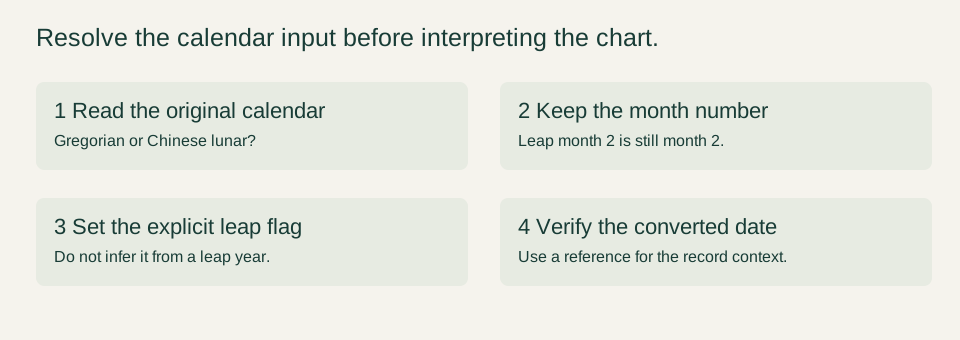
Select Lunar, enter the lunar year, month and day, and turn on Leap month only if the record explicitly identifies that month as leap. Keep the repeated month number: leap month 2 is still entered as month 2. Confirm the converted Gregorian date before interpreting the chart.
One checkbox, two different Gregorian dates
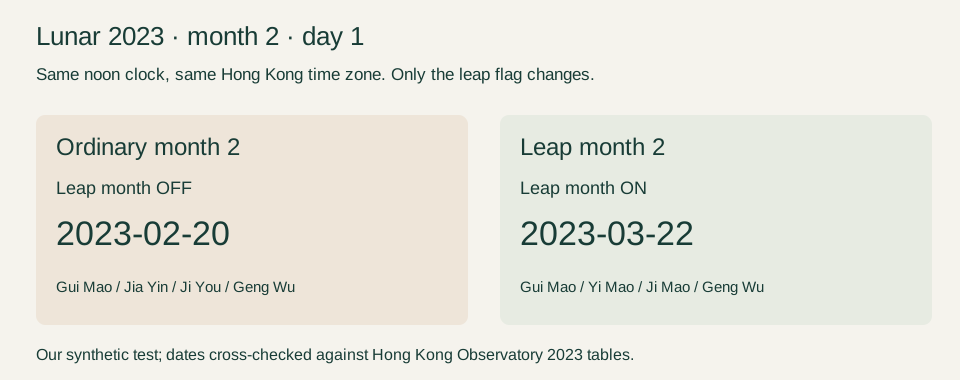
We tested lunar year 2023, month 2, day 1 twice in the unchanged calculator. The only changed input was the Leap month checkbox. The ordinary date converted to February 20, 2023. The leap date converted to March 22, 2023. Replacing the checkbox with a guess would select the wrong day.
| Input | Leap month | Converted Gregorian date | Year / Month / Day / Hour |
|---|---|---|---|
| 2023 · month 2 · day 1 | Off | 2023-02-20 | Gui Mao / Jia Yin / Ji You / Geng Wu |
| 2023 · month 2 · day 1 | On | 2023-03-22 | Gui Mao / Yi Mao / Ji Mao / Geng Wu |
Both tests used 12:00, Asia/Hong_Kong, east longitude 114.1694°, true solar time OFF, midnight day boundary, known hour, male. These are fabricated test settings. Location and clock conventions were held constant, so this comparison isolates the lunar leap-month selection rather than a time-zone or solar-time adjustment.
Check a calendar reference before using the result
The Hong Kong Observatory’s 2023 Gregorian–lunar conversion table places the first day of ordinary month 2 on February 20 and the first day of the repeated second month on March 22. Its March calendar marks March 22 as the start of leap month 2. This independently checks the date conversion in our example; it does not validate Bazi interpretation. See the linked official tables below.
We also converted each resulting Gregorian date back to lunar form. February 20 returned year 2023, month 2, day 1; March 22 returned year 2023, leap month 2, day 1. The raw ledger records the library’s negative month code for the leap instance. Enter the positive month number and use the checkbox in the website form; that internal code is not a user instruction.
A reverse conversion with the same library checks internal consistency rather than independent accuracy. The Observatory table provides the separate date reference here. We checked this 2023 example in the Hong Kong calendar context; do not assume every historical or regional calendar record uses identical date conventions.
Enter it without silently converting twice
- Read the original record: determine whether it uses the Gregorian calendar or a Chinese lunar date.
- For a lunar record, select Lunar and enter the lunar year, month number and day exactly as recorded.
- Enable Leap month only when that specific month is marked leap. A leap year alone is not enough.
- Keep the recorded local clock time and the correct birthplace time zone. Leave an unknown hour unknown.
- Calculate and compare the converted Gregorian date with a trustworthy reference for that year and calendar context.
We entered the two converted dates again with Gregorian selected and kept all clock settings unchanged. Each Gregorian entry reproduced all four pillars of its corresponding lunar entry. That is the practical double-conversion check: use either the original lunar date with Lunar selected or the converted date with Gregorian selected, not a converted date mislabeled as lunar.
What if the leap-month box is wrong?
Our negative test entered lunar 2024, month 2, day 1 with Leap month enabled. The engine rejected it with: “This lunar date or leap month does not exist. Check the lunar birth record.” This is an observed error for that exact test, not a reason to disable the checkbox and accept a different date without checking the record.
If the record says only “month 2,” and you cannot determine whether it means the ordinary or leap month, the input is unresolved. For the 2023 example, the two candidate dates and charts in our table should remain separate until the record is clarified. The website’s unknown-hour option does not resolve an unknown calendar date.
Why lunar month 2 is not automatically a Mao Month pillar
In our controlled outputs, ordinary lunar month 2 day 1 gave Jia Yin as the Month pillar, while leap lunar month 2 day 1 gave Yi Mao. The month number printed in a lunar date therefore cannot be copied directly into the Bazi Month pillar. This calculator derives that pillar using its solar-term convention after converting the input date.
The leap-month checkbox identifies the calendar date; it is not an extra Bazi pillar and does not add another month to the chart layout. The output still has Year, Month, Day and Hour. Near a solar-term boundary, inspect the actual conversion settings and boundary instant instead of relying on the lunar month label alone.
Quick answers
Is leap month 2 entered as month 3?
No. In this test it remains month 2 with Leap month enabled. Entering month 3 changes the input rather than distinguishing the repeated second month.
Is a lunar leap month February 29?
No. February 29 is a date in the Gregorian calendar. The repeated lunar month in this example starts on March 22, 2023, and is selected through the lunar input controls.
Should I convert my record first?
You may use a verified Gregorian conversion with Gregorian selected, or enter the original lunar record with Lunar selected. Our equivalence test confirms those two correctly matched routes for these examples.
Does the leap flag fix an unknown birth time?
No. The flag selects a calendar date. If the hour is unknown, use Unknown time and keep its uncertainty. Do not invent a time to complete the chart.
Test record and sources
Our downloadable test ledger includes every setting, both converted dates, both four-pillar outputs, reverse-conversion results and the invalid-input error. These checks establish the behavior of this calculator on these samples; they are not proof of astrological predictions or a validation of every supported date.
- Hong Kong Observatory: Gregorian–lunar conversion table for 2023.
- Hong Kong Observatory 2023 calendar: March 22 leap-month marker.
- lunar-javascript source: bundled version 1.7.7; calendar conversion and pillar implementation.
- This calculator’s conventions and supported range.