BIRTH TIME, EXPLAINED
Does daylight saving time change your Bazi chart?
Yes—daylight saving can change the Hour pillar if the resolved time crosses an hour-branch boundary. Enter the clock time from your birth record and your historical birthplace time zone. This calculator handles DST automatically: do not subtract an hour yourself. During a repeated autumn hour, keep both possibilities until the record identifies which occurrence you were born in.
The same clock time can mean two different moments
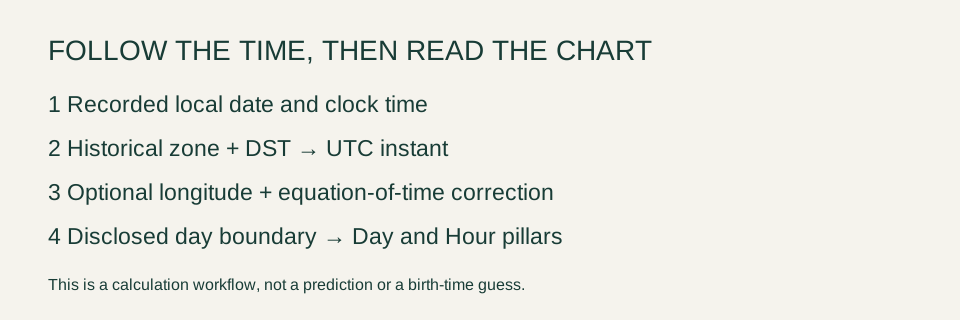
Historical civil time comes first. Longitude and the equation of time come afterward if you choose true solar time. These are separate adjustments. A present-day UTC offset is not a substitute for the offset in force on your birth date. IANA time-zone records preserve historical offsets and daylight-saving transitions; your browser supplies the time-zone data used here.
Our controlled New York test
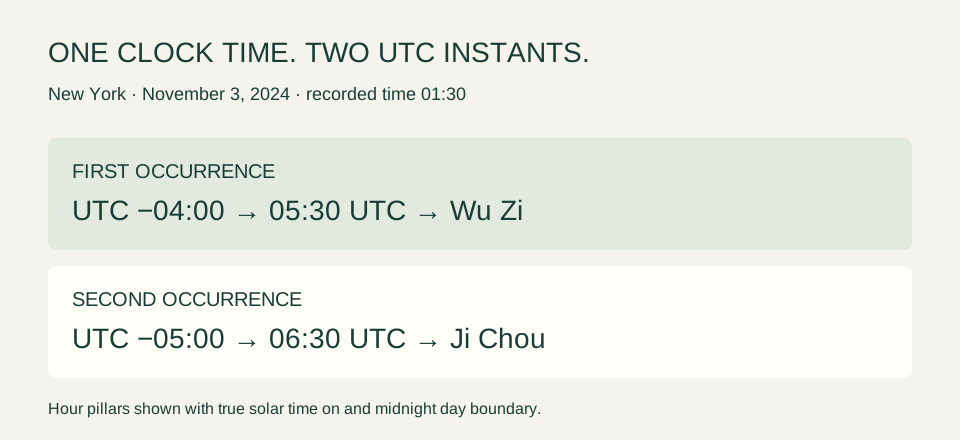
We entered Gregorian November 3, 2024, 01:30, New York, Male, true solar time on and a midnight day boundary. The built-in city longitude was −74.00597°. We changed only “Repeated DST hour,” inside Time & location settings. These are software test inputs, not a real person’s birth details.
| Setting | First occurrence | Second occurrence |
|---|---|---|
| UTC offset | −04:00 | −05:00 |
| UTC instant | 05:30 UTC | 06:30 UTC |
| True solar clock | 00:50 | 01:50 |
| Year / Month / Day | Jia Chen / Jia Xu / Xin Wei | Jia Chen / Jia Xu / Xin Wei |
| Hour pillar | Wu Zi | Ji Chou |
The correction shown in the calculation receipt was −39.7 minutes for the first occurrence and +20.3 minutes for the second. Its displayed equation of time was +16.4 minutes. The site applies the NOAA approximation: correction = equation of time + 4 × east longitude − UTC offset in minutes. The full internal precision is used before the display is rounded. This is why a one-hour difference in UTC offset can also shift the chosen solar-clock hour branch.
Spring-forward is a different problem
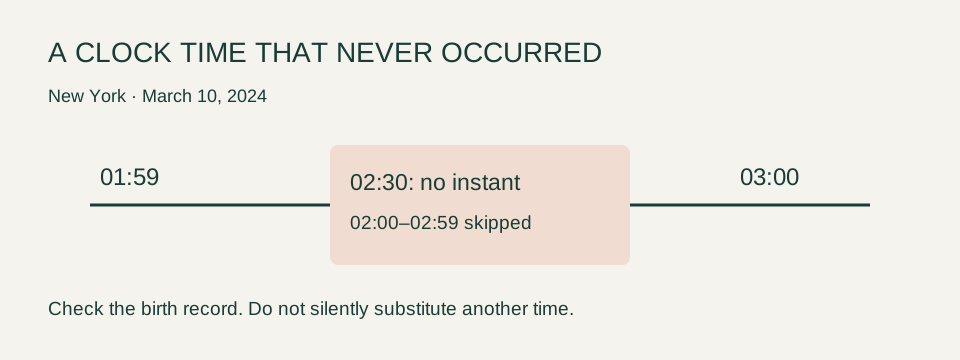
We also entered March 10, 2024, 02:30 in New York. This local clock time was in the skipped interval. The calculator refused to create a new chart and displayed: “This local time did not exist because the clocks moved forward. Enter a time from the birth record outside the DST gap.” A chart still visible from an earlier calculation is not a result for that rejected input.
How to enter a DST-sensitive birth
- Keep the date and recorded local clock time exactly as documented. Identify the calendar before entering it.
- Select the birthplace, then check its IANA time zone and longitude in Time & location settings. A city centre is only an approximation of the actual birthplace.
- Choose whether to use true solar time and which day-boundary convention you want. Keep those settings constant when comparing charts.
- If the site flags a repeated hour, calculate both occurrences. If it flags a nonexistent time, inspect the record rather than silently moving the clock.
- Open “See how your time became this chart” and compare the historical UTC offset, UTC instant and pillar clock before interpreting the result.
Questions that matter before reading the chart
Should I subtract an hour first?
No, not in this tool. Enter the recorded civil time. Manually subtracting an hour and then allowing the historical time-zone resolver to handle DST risks applying the adjustment twice. Tools that explicitly ask for standard time may use a different input convention.
Does every DST change alter a pillar?
No. The result depends on whether a relevant boundary is crossed under the selected settings. Our example demonstrates a change; it is not a frequency estimate for all births.
Which autumn occurrence is correct?
The one supported by the birth record, hospital notes or another reliable time reference. The default “First occurrence” is a software choice, not evidence about your birth. If the record cannot resolve it, keep both charts provisional.
Can a precise chart prove a prediction?
No. Resolving civil time is a timekeeping task. Bazi interpretations are traditional symbolic readings, not scientifically established forecasts. The site's strength score is a disclosed heuristic.
Sources and limits
The examples were run in our browser-based calculator on October 26, 2026, using its bundled lunar-javascript 1.7.7 calendar engine, automatic historical time zones, true solar time and the midnight setting. Browser time-zone data can change with software updates. Our solar correction is approximate; do not treat a rounded display near a boundary as a precise ephemeris.
- IANA: time-zone and daylight-saving data — historical civil-time offsets and database limitations.
- NOAA: General Solar Position Calculations — equation of time and true solar time formula.
- Calendar engine source — traditional pillar and calendar implementation.
- Our complete calculation conventions — supported range, unknown times and interpretive limits.